
October 18, 2026
ReadyTools Workspace Adds Databases and a Daily Today View
Explore how Workspace Databases organize connected records, while the Today block brings daily priorities into view alongside other Workspace tools.
Artikel lesen
Blog-Artikel
Pick any color from any image in seconds with ReadyTools' Color Picker from Image. Upload your image, click to get HEX, RGB, or HSL codes, and generate ful
laszlo
May 1, 2025
3 Min. Lesezeit
Image source: img.freepik.com
Teilen
Have you ever come across an image with a beautiful color and thought, “I wish I knew the exact code for that”? Whether you're designing a website, working on branding, or just putting together a nice graphic, having the right colors is key.
That's exactly what Color Picker from Image by ReadyTools helps you do — get any color from any image, fast and easily. Just upload a photo, click on the color you want, and boom — you’ve got the HEX, RGB, and HSL codes right in front of you.
The Color Picker from Image isn’t just a basic color detector. It’s a lightweight, browser-based tool that helps you:
Pick a color from the image with a simple click.
Copy the color codes in HEX, RGB, or HSL format.
Get a full color palette from your uploaded image.
Save time and avoid guessing or using clunky photo editing software.
You can try it out here:
👉 https://www.readytools.co/color/color-picker-from-image/
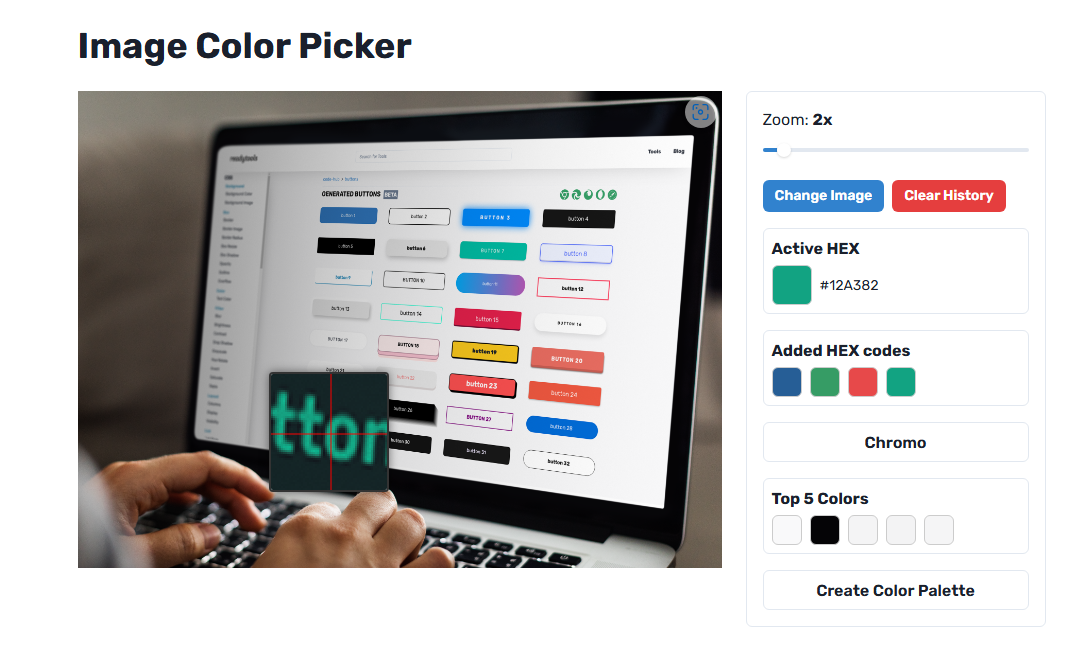
This tool is made for anyone who deals with visual content:
Designers who want to grab specific shades from reference images.
Developers looking to match UI colors with images or logos.
Content creators aiming for consistent colors across graphics.
Marketers working on presentations, banners, or ad creatives.
Or even just curious people who want to know what color that one flower is in their photo.
Upload an image (JPG, PNG, WebP — anything works).
Click anywhere on the image.
Instantly get the exact color code.
Copy the code and paste it into your design tool, CSS, or wherever you need it.
You also get an auto-generated color palette based on the main colors in the image, which is super helpful when you're trying to build a whole theme or mood.
If you find a HEX code you really like, you can plug it into Chromo, another tool by ReadyTools. Chromo gives you detailed info like:
Color variations (lighter, darker, shades, tints)
Accessibility contrast ratios
Related and complementary colors
Copyable formats: CMYK, RGB, HSL, and more
It’s perfect when you need to go beyond just grabbing a color and want to build something around it.
No downloads, no bloat — just open your browser.
Mobile-friendly and works great in Chrome (and other browsers too).
It’s completely free.
No need to install extensions or deal with slow image editors.
It just works — fast.
The Color Picker from Image tool might seem simple, but once you start using it, you’ll wonder how you ever lived without it.
It’s perfect for getting color from image files in seconds, building palettes, or just making sure your designs look as clean and consistent as possible.
Give it a try next time you’re working with images — whether it’s for a serious design project or just for fun.
Entdecke ReadyTools: die ultimative Produktivitätssuite für Creator. Wunderschöne Linksy-Seiten, smarte Lara-KI, Projektmanagement, sicherer Cloud-Speicher und alles andere, was du brauchst – vereint an einem Ort. Starte noch heute deine 7-tägige kostenlose Testphase.
ReadyTools erkundenWeiterlesen
October 18, 2026
Explore how Workspace Databases organize connected records, while the Today block brings daily priorities into view alongside other Workspace tools.
Artikel lesen

October 11, 2026
Learn how to add a Canvas block in ReadyTools, sketch ideas, build diagrams with Lara, embed files, collaborate, and export your work.
Artikel lesen

October 6, 2026
the platform has continued moving from individual API endpoints toward something much closer to the infrastructure we originally wanted to build.
Artikel lesen