
October 18, 2026
ReadyTools Workspace Adds Databases and a Daily Today View
Explore how Workspace Databases organize connected records, while the Today block brings daily priorities into view alongside other Workspace tools.
Cikk elolvasása
Blog cikk
Linksy Tabs lets you organize your bio link into up to 3 sections, turning a single scroll page into a clean, professional mini website for your brand.
readytools
August 31, 2025
3 perc olvasás
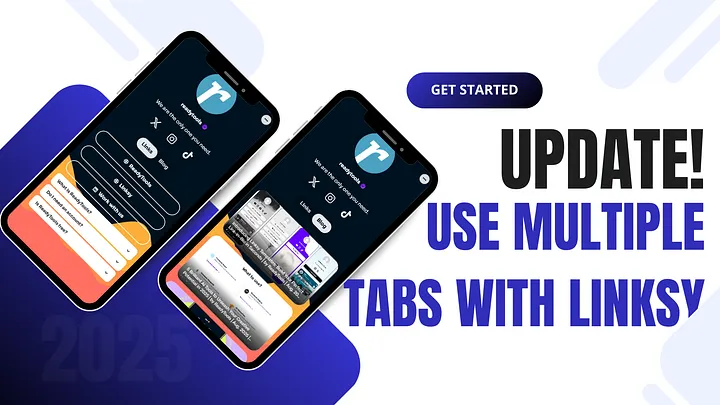
Image source: miro.medium.com
Megosztás
That changes today. With the launch of Tabs for Linksy, we’re rethinking what a bio link can be. Instead of forcing everything into a single page, you can now organize your content into up to three tabs — turning your Linksy into a structured, professional mini website.

The traditional one-page approach has limitations:
Tabs solve these problems by allowing you to split your content into sections. Think of it as moving from a single flyer to a multi-page brochure. Instead of overwhelming visitors, you guide them to exactly what they care about.
When you update your Linksy, you’ll now have the option to add multiple tabs. Each tab functions like its own page within your profile, with full customization:
Visitors can easily switch between tabs without leaving your profile, making navigation smoother and more engaging.
Tabs aren’t just a “nice to have.” They’re a game-changer for anyone who wants to present their brand or content in a more professional way.
In short: if you’ve ever felt limited by the “one long link list,” Tabs unlock a new level of flexibility.
At ReadyTools, our mission with Linksy has always been to give users more control and creativity than traditional bio link tools. Tabs are the next step in that evolution.
Instead of being just another link list, your Linksy now feels like a hub — a place where your audience can explore your brand without friction.
This update also sets the stage for future expansions: more customization, more modules, and more ways to turn a simple bio link into a powerful digital presence.
The update is live for all Linksy users. Log in, update your page, and try adding up to three tabs to see the difference.
Your audience deserves a clean, well-structured experience — and you deserve a bio link that actually grows with you.
Final Thought: The link-in-bio space hasn’t evolved in years. By introducing Tabs, Linksy isn’t just catching up — it’s moving ahead, giving users the flexibility to design their online presence the way they want.
Fedezd fel a ReadyTools-t: a tökéletes produktivitási csomagot alkotók számára. Gyönyörű Linksy oldalak, intelligens Lara AI, projektmenedzsment, biztonságos felhőtárhely és minden más, amire szükséged van — mind egy helyen. Kezdd el a 7 napos ingyenes próbaidőszakot még ma.
ReadyTools felfedezéseOlvasd tovább
October 18, 2026
Explore how Workspace Databases organize connected records, while the Today block brings daily priorities into view alongside other Workspace tools.
Cikk elolvasása

October 11, 2026
Learn how to add a Canvas block in ReadyTools, sketch ideas, build diagrams with Lara, embed files, collaborate, and export your work.
Cikk elolvasása

October 6, 2026
the platform has continued moving from individual API endpoints toward something much closer to the infrastructure we originally wanted to build.
Cikk elolvasása