
October 2, 2026
Turn a Screenshot Into an iPhone Mockup With ReadyTools Web Assistant
Capture a webpage, place the screenshot in an iPhone frame, adjust the scene, and export a polished image or animation from one browser extension.
Cikk elolvasása
Blog cikk
How could you start sharing your color palette? A brief guide on how and why to do it.
laszlo
January 13, 2025
4 perc olvasás
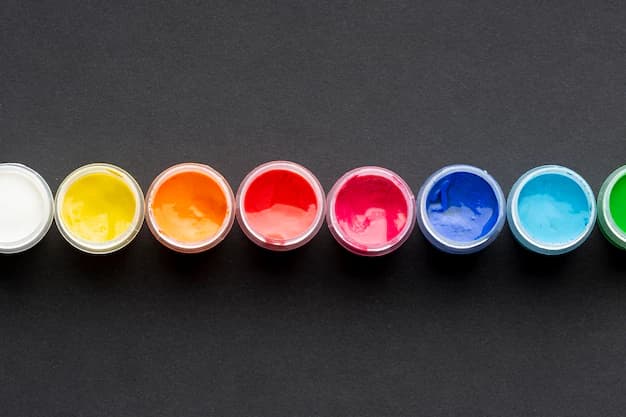
Image source: img.freepik.com
Megosztás
ReadyTools has just rolled out a fantastic new feature that lets registered users upload their own custom color palettes right in the color palette tool! This exciting addition really amps up the user experience by giving designers more flexibility and a chance to personalize their projects. In this blog post, we’ll dive into the many perks of this new feature. First off, it opens the door to greater creative freedom, allowing you to express your unique style. It also helps maintain consistency in branding, which is crucial for any design project. Plus, it encourages better collaboration among team members when working on design tasks.
The first step is to register on the site, if you haven't already you can do this at www.readytools.co/signup. Once you're registered, you'll be able to create a new palette on the color palette page.
When creating a palette you can enter 2 to 5 colors, a title, and a description. In addition to these, it is important to add categories.
There are two types of categories into which we divide our palettes. The first category is the normal category. For example, we categorize brand, pastel, dark, or even light. There are lots of categories. Another category is the color category. Our users must be able to search by color, so specifying a color category is mandatory. For example, if you are creating a white color palette, indicate that you are putting it in the white color category.
Once you've selected your color, enter the title. The title is very important, as others will use it to search for your palette. Choose a title that is not already used to make it unique. The title should be short, and concise but to the point. Your second step is to describe the color. Here you can write a more detailed description of your palette so that others can understand your color combination. You can use more characters here than in the title but don't make it too long. Your next step is to choose the categories. Be precise with your category choices to get more likes from other users.
Once you have everything, try to upload it. If successful, your palette will be judged by our moderators. This is important to spare everyone from any spam or other negative stuff. This will also allow us to filter out if there is already a similar palette.
Once accepted, congratulations, you can share your palette with anyone. You can earn likes through your palettes and help other users to promote their creative work. Users can like and save palettes to favorites.
1. Share Your Creativity
ReadyTools gives you a platform to showcase your unique color combinations to a global community. By uploading your palettes, you can inspire others, provide solutions for their projects, and gain recognition for your creativity.
2. Build a Portfolio
Every palette you upload becomes part of your profile, allowing you to create a digital portfolio of your design skills. This is especially useful for designers, artists, and anyone looking to establish themselves in the creative industry.
3. Help Others
Your carefully crafted color palettes can become invaluable resources for other users. Whether someone is working on branding, web design, or art, your palette could be exactly what they need to elevate their work.
4. Discover and Collaborate
The ability to share palettes encourages community interaction. You can receive likes, feedback, and even connect with others who appreciate your style. It's a chance to collaborate and grow as part of a creative network.
5. Get Recognized and Earn Rewards
The more palettes you upload, the more visible you become on the platform. Earning likes and hearts from other users helps boost your profile, making you stand out. Additionally, ReadyTools may introduce rewards, such as badges or exclusive features, for active contributors.
6. Organize Your Favorite Palettes
Beyond sharing, uploading palettes allows you to keep your favorite combinations organized and accessible. You'll always have your best work at your fingertips, ready for your next project.
7. Join a Moderated and Curated Community
The moderation process ensures a high-quality, spam-free experience for everyone. This means your contributions are part of a curated collection that users trust and appreciate.
8. Enhance Your Creativity
Uploading palettes encourages you to think critically about color combinations, categories, and how they can be useful to others. This process can enhance your skills as a designer and improve your understanding of color theory.
By uploading your palettes, you're not only sharing your creative ideas but also contributing to a growing community of designers, developers, and artists. It's a win-win situation for others, showcase your skills, and gain recognition for your work!
Fedezd fel a ReadyTools-t: a tökéletes produktivitási csomagot alkotók számára. Gyönyörű Linksy oldalak, intelligens Lara AI, projektmenedzsment, biztonságos felhőtárhely és minden más, amire szükséged van — mind egy helyen. Kezdd el a 7 napos ingyenes próbaidőszakot még ma.
ReadyTools felfedezéseOlvasd tovább
October 2, 2026
Capture a webpage, place the screenshot in an iPhone frame, adjust the scene, and export a polished image or animation from one browser extension.
Cikk elolvasása

September 30, 2026
No settings to flip.No plan changes required. If you’re already on Max, Lara is running the new model. If you use Agent mode on Plus you are getting it too
Cikk elolvasása
September 30, 2026
Learn how to review HTTPS, security headers, DNS and other visible website safety signals, then understand what a scan can and cannot tell you.
Cikk elolvasása