November 22, 2026
Not Everyone Should See Everything: Rethinking Permissions in Collaborative Workspaces
Sharing information with a team should be simple.
Cikk elolvasása
Blog cikk
We have all been there.
readytools
November 21, 2026
5 perc olvasás
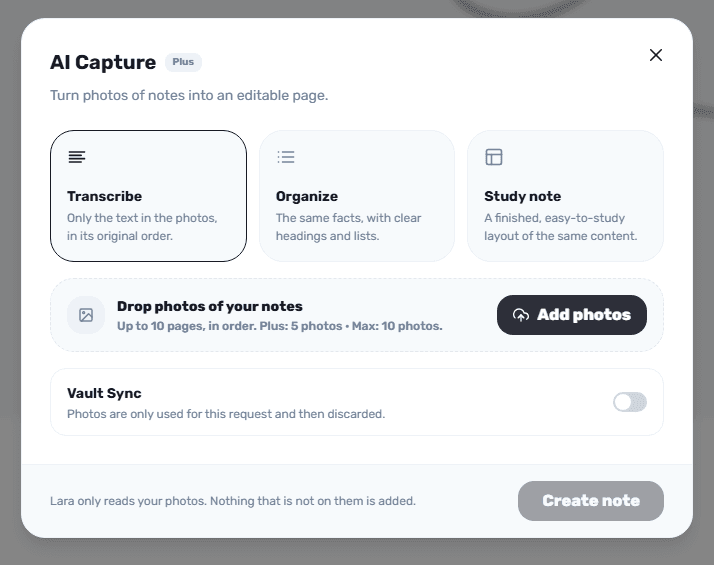
Image source: vault.readytools.co
Megosztás
We have all been there.
You take a photo of your handwritten lecture notes because you want to organize them later. You photograph several pages from a textbook, save screenshots from a meeting, or collect printed documents that contain information you might need in the future.
But eventually, those images start accumulating.
The information is there, but it isn’t particularly useful when you need to search, edit, reorganize, or build something from it.
Manually typing everything again is time-consuming. And simply keeping hundreds of images in folders isn’t exactly an efficient way to manage information.
This is one of the problems we wanted to address with AI Capture, a feature available in ReadyTools Workspace.
AI Capture transforms photos of handwritten or printed notes into editable pages using Lara AI.
Instead of manually transcribing your notes, you can upload photographs, arrange them in the correct order, select how you want the information processed, and let AI prepare an editable document.
The important part is that you remain in control of the result.
AI Capture doesn’t simply produce one generic transcription. It offers three different processing modes, depending on what you actually need.
Not every document has the same purpose. Sometimes you want an accurate transcription. Other times, you want something easier to study or read.
That’s why AI Capture includes three modes.
Sometimes you don’t want AI to reorganize anything.
You simply want your handwritten notes converted into editable text while preserving their original order.
That’s what Transcribe does.
It’s particularly useful when:
Raw notes aren’t always easy to work with.
You might have several paragraphs, scattered ideas, and information that would benefit from clearer organization.
Organize takes the same information and presents it using headings and lists.
It doesn’t aim to replace your original information with something different. Instead, it makes the existing content easier to navigate and understand.
This is particularly useful for meeting notes, research material, and longer documents.
Students often have a slightly different problem.
They don’t necessarily need a direct transcription. They need their information presented in a format that makes revision easier.
Study Note creates a study-friendly layout from your uploaded photographs.
For example, you can photograph several pages of handwritten lecture notes and turn them into a structured study document inside your Workspace.
Instead of switching between your photo gallery and a separate document editor, you can keep the resulting material where you already organize your work.
Getting started is straightforward.
Step 1: Open ReadyTools Workspace
Open an existing page or a board card where you want to work.
Step 2: Add AI Capture
Type / in the editor and search for AI Capture.
 ReadyTools Workspace AI Capture menu
Step 3: Upload your photographs
Select the photos containing your handwritten or printed notes.
You can add multiple photographs and drag them into the order in which Lara should read them.
 Source: Reddit r/notebooks
Step 4: Choose your processing mode
Select Transcribe, Organize, or Study Note depending on your intended result.
Step 5: Review the generated document
Before inserting anything, you can preview the result or edit the generated Markdown.
One detail we consider particularly important is how uncertain text is handled.
When Lara cannot confidently read something, it marks that section with [?]. This gives you an opportunity to review the original photograph instead of assuming every transcription is correct.
Step 6: Insert your document
ReadyTools Workspace AI Capture menu insert
You can insert the finished page after your current cursor or create a new page below the existing one.
That’s it. Your photographs have become editable Workspace content.
 ReadyTools Workspace: Inserted text
We wanted AI Capture to fit naturally into the broader Workspace experience.
That’s why it isn’t limited to a standalone conversion screen.
You can use it on Workspace pages and inside board cards. You can also choose how your uploaded photographs are handled.
With Vault Sync enabled, your photos are saved to your ReadyTools Vault. Without Vault Sync, they are used for the processing request and then discarded.
There are also a few practical limitations worth knowing:
We believe transparency about how AI works is just as important as the features themselves.
Although we initially see this as a particularly useful feature for students, its applications go considerably further.
Students: Convert handwritten lecture notes, textbook summaries, and printed learning materials into editable study documents.
Professionals: Digitize meeting notes and printed documents without manually rewriting everything.
Researchers: Bring information from multiple photographed pages into one organized document.
Everyday users: Keep important information from physical notes accessible and editable in one digital workspace.
The common idea is simple: information should be easy to work with, regardless of whether it originally existed on paper or on a screen.
AI Capture is included with ReadyTools Plus.
If you haven’t tried Plus yet, you can explore it with a 7-day free trial.
There is no long-term commitment. You can cancel your subscription at any time if you decide it isn’t right for you.
We want people to have the opportunity to explore the platform, try its features, and decide for themselves whether it fits their workflow.
You can learn more about the available plans here:
At ReadyTools, we believe a workspace should do more than give you somewhere to store documents.
It should help you create, organize, understand, and use the information you collect every day.
AI Capture is one small but meaningful step in that direction.
Instead of leaving your notes trapped inside photographs, you can turn them into something editable, structured, and ready to use.
Ready to try it?
Explore AI Capture:
https://readytools.co/workspace/blocks/ai-capture/
Discover ReadyTools Workspace:
https://readytools.co/workspace/
ReadyTools — Everything You Need. Already Here.
Fedezd fel a ReadyTools-t: a tökéletes produktivitási csomagot alkotók számára. Gyönyörű Linksy oldalak, intelligens Lara AI, projektmenedzsment, biztonságos felhőtárhely és minden más, amire szükséged van — mind egy helyen. Kezdd el a 7 napos ingyenes próbaidőszakot még ma.
ReadyTools felfedezéseTartalomjegyzék
Olvasd tovább
November 22, 2026
Sharing information with a team should be simple.
Cikk elolvasása

November 13, 2026
Build a sustainable music practice routine by pairing a short practice plan with a weekly habit tracker and a focused checklist.
Cikk elolvasása

November 13, 2026
Build a shared sprint overview with a Kanban board, an Upcoming agenda, and a metric tile, then use it to check work and deadlines.
Cikk elolvasása