November 21, 2026
From Handwritten Notes to Editable Documents: Meet AI Capture in ReadyTools Workspace
We have all been there.
Cikk elolvasása
Blog cikk
Sharing information with a team should be simple.
readytools
November 22, 2026
7 perc olvasás
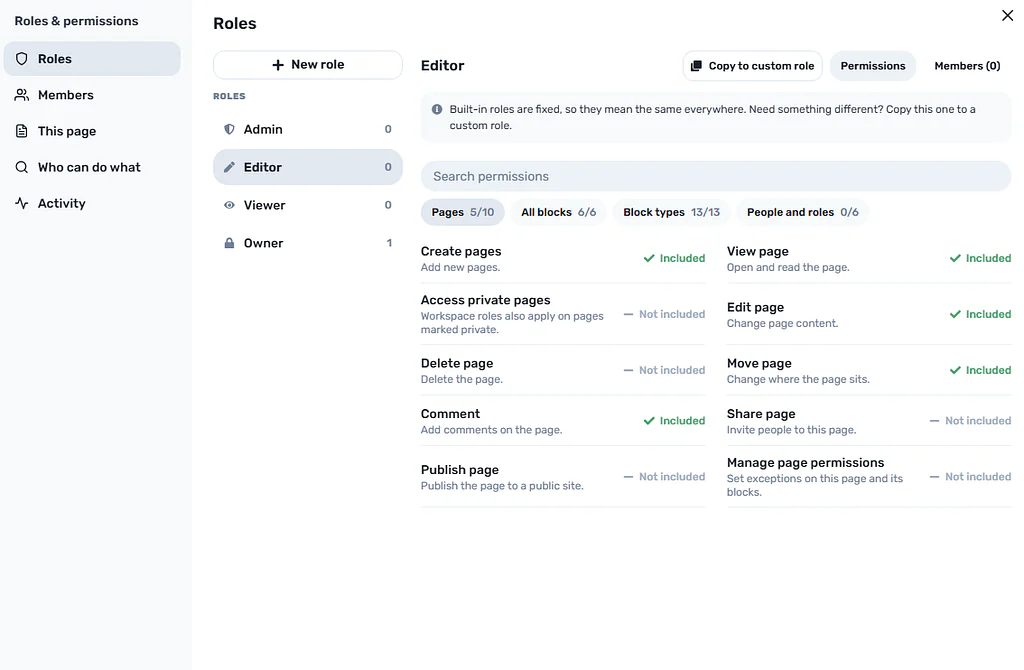
Image source: cloud.readytools.co
Megosztás
Sharing information with a team should be simple.
But deciding exactly who can access that information is often surprisingly complicated.
Imagine working on a project with ten people. Some need to edit documents, others only need to review them, and a few should have access to sensitive information that the rest of the team shouldn’t see.
You might also have external clients, contractors, or reviewers who need access to specific parts of your workspace.
Most collaboration tools offer a relatively simple solution: view or edit.
But real teams rarely work that way.
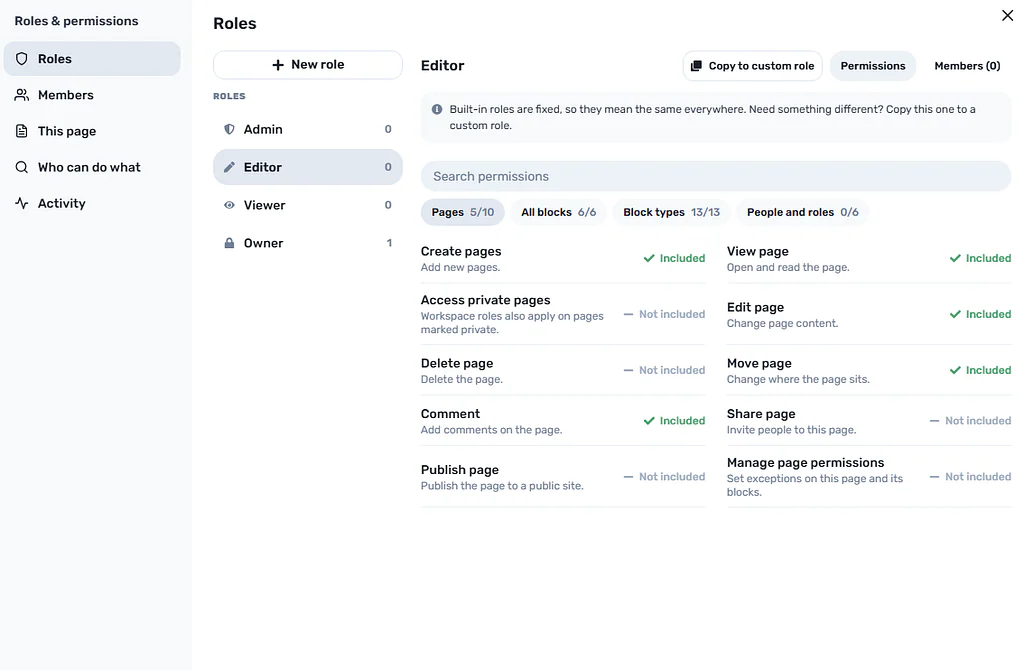
At ReadyTools, we wanted to approach this problem differently. That’s why we built a detailed Roles & Permissions system into ReadyTools Workspace.
The idea is simple: you should be able to decide who can do what, and who can see exactly which information, down to an individual content block.
 ReadyTools Workspace Roles & permissions
Many applications treat permissions as something that applies to an entire workspace, folder, or document.
This works until your requirements become more complicated.
Consider a project containing:
A designer might need access to the technical documentation but not financial information.
A client might need to see project updates without accessing internal discussions.
A reviewer might need to inspect specific content without being able to modify the entire project.
With basic view-and-edit permissions, managing these situations becomes difficult.
Teams often respond by creating separate documents, duplicating information, or maintaining multiple versions of the same content.
That creates another problem: information becomes scattered.
We believe permissions should solve this problem rather than create additional organizational work.
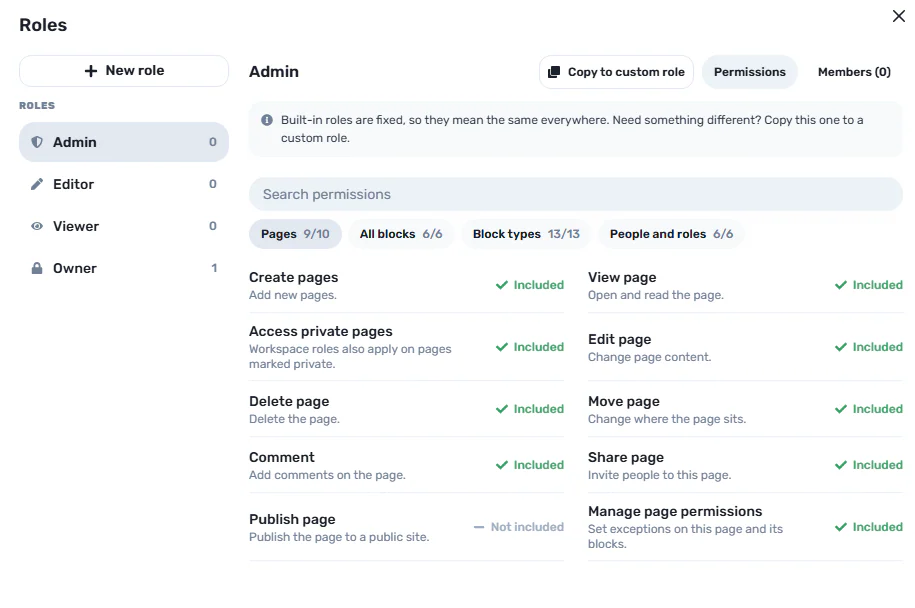
ReadyTools Workspace starts with four built-in roles.
 ReadyTools Workspace Roles
The Owner holds the Workspace and always retains full access.
Only the Owner can appoint Admins, and ownership cannot be assigned through the ordinary member-role system.
Admins manage members, roles, sharing, and page permissions.
They help maintain the workspace without requiring the Owner to handle every administrative task.
Editors can create, edit, and move content.
This role is designed for people actively working with the information inside a Workspace.
Viewers can open and comment on pages.
They can participate in discussions without receiving the editing capabilities of an Editor.
These four roles are fixed. Their meaning remains consistent throughout the Workspace.
However, not every team fits into four predefined categories.
That’s why we also introduced custom roles.
One of the most useful parts of the system is the ability to create custom roles.
Think about roles on a Discord server.
You might have moderators, administrators, verified members, or other groups with different capabilities.
ReadyTools Workspace applies a similar concept to collaborative work.
You can create roles such as:
You can copy a built-in role, customize the additional capabilities, and assign the resulting role to members.
Custom roles appear as colored pills next to member names, making it easier to understand someone’s responsibilities.
There is also an important rule: custom roles add capabilities to someone’s base role. They cannot remove the permissions every Viewer already has.
This keeps the permission system predictable.
Not every page should follow exactly the same rules.
For example, you might have a project with several pages:
Most team members might have access to the project overview, while financial planning should be restricted to administrators.
ReadyTools Workspace allows you to create exceptions for an individual role or person on a specific page.
These exceptions also apply to everything underneath that page.
This means you don’t need to reorganize your entire Workspace just because one document requires different access rules.
You can adjust permissions where they are actually needed.
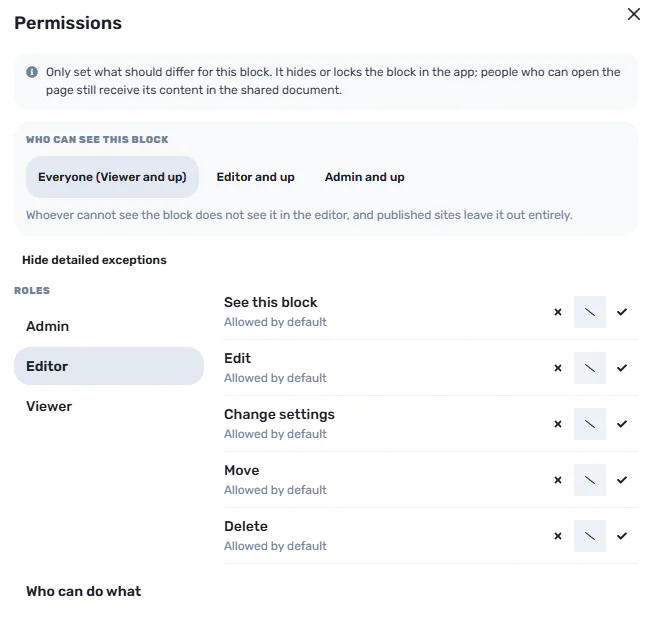 ReadyTools Workspace block level permissions
This is where the system becomes particularly interesting.
A single Workspace page can contain different types of information.
For example, imagine a project overview containing:
You might want everyone to see the introduction and milestones, while only administrators should see the financial breakdown.
Instead of creating separate pages, you can control visibility at the individual block level.
Each block can have one of three built-in visibility settings:
Everyone
The block is visible to everyone who can access the page.
Editor and up
Only Editors, Admins, and the Owner can see the block by default.
Admin and up
Only Admins and the Owner can see the block by default.
You can also explicitly allow or deny custom roles.
And if you want to return to a consistent configuration, there is a one-button option to reset the visibility settings of every block on the page.
This provides a much more flexible way to organize shared information.
There is an important difference between hiding something in an interface and preventing someone from accessing it.
Imagine a document where certain sections are hidden using frontend JavaScript or CSS.
The content might not appear on the screen, but it could still be included in the page source or delivered to the browser.
That isn’t sufficient protection for sensitive information.
We wanted permissions to be enforced by the server itself.
In ReadyTools Workspace, people who aren’t allowed to read a particular block do not receive that hidden content from the server.
The same principle applies to published sites: blocks hidden from Viewers are excluded from the published page.
This is an important architectural decision.
Permissions shouldn’t simply determine which buttons someone can click. They should determine which information someone is allowed to receive.
Complex permission systems can become difficult to troubleshoot.
What happens when someone has an Editor role but a particular page denies them access?
What if a custom role grants a capability while another rule denies it?
Instead of forcing administrators to guess, ReadyTools Workspace includes a feature called Who can do what.
It shows the capabilities available to a particular person on the current page and explains the reason behind each permission decision.
The system also follows a defined rule precedence:
Additionally, every permission change is recorded in an activity log.
This makes it easier to understand not only what someone can access, but also how that access was configured.
We didn’t want permissions to behave differently depending on where information is stored.
That’s why ReadyTools Workspace uses one permission system across:
Whether you’re working on an internal document, sharing a project with a client, or publishing a page, the same underlying permission principles apply.
This creates a more consistent experience as your Workspace grows.
Although detailed permissions might initially sound like an enterprise-only feature, they are useful for teams of many different sizes.
Small teams: Give everyone access to shared project information while keeping internal discussions restricted.
Agencies: Collaborate with clients without exposing internal planning and financial information.
Businesses: Separate administrative responsibilities from everyday content editing.
Project managers: Give reviewers, contractors, and team members different levels of access.
Knowledge management teams: Maintain a shared knowledge base without making every document accessible to every member.
The common requirement is control over information.
Not everyone needs the same access, and your workspace should reflect that.
You don’t need to configure everything immediately.
You can start with the built-in roles and introduce additional restrictions as your Workspace grows.
A simple starting process looks like this:
This approach keeps the system simple when you don’t need advanced configuration while giving you more control when you do.
Collaboration and privacy shouldn’t be opposites.
You should be able to work with other people, share documents, publish information, and manage projects without automatically exposing everything in your Workspace.
That’s the philosophy behind ReadyTools Workspace Roles & Permissions.
We believe a good permission system should be flexible enough for complex teams, understandable enough for everyday use, and secure enough that hidden information genuinely stays inaccessible to unauthorized users.
You shouldn’t have to choose between collaboration and control.
Try ReadyTools Workspace for free.
Explore Roles & Permissions:
Discover ReadyTools Workspace:
ReadyTools Plus also includes a 7-day free trial, and you can cancel your subscription at any time.
Explore plans:
ReadyTools — Everything You Need. Already Here.
Fedezd fel a ReadyTools-t: a tökéletes produktivitási csomagot alkotók számára. Gyönyörű Linksy oldalak, intelligens Lara AI, projektmenedzsment, biztonságos felhőtárhely és minden más, amire szükséged van — mind egy helyen. Kezdd el a 7 napos ingyenes próbaidőszakot még ma.
ReadyTools felfedezéseTartalomjegyzék
Olvasd tovább
November 21, 2026
We have all been there.
Cikk elolvasása

November 13, 2026
Build a sustainable music practice routine by pairing a short practice plan with a weekly habit tracker and a focused checklist.
Cikk elolvasása

November 13, 2026
Build a shared sprint overview with a Kanban board, an Upcoming agenda, and a metric tile, then use it to check work and deadlines.
Cikk elolvasása