The Notion alternative
Your notes, docs and projects. Now encrypted and AI-powered.
ReadyTools Workspace is the connected workspace for notes, docs, projects and files. Write with blocks, plan with your team, ask Lara AI and publish finished pages, all in one secure place.
Free plan. No credit card required.
The problem
One workspace should be enough.
Most note tools stop at the page. Then you add an AI chat, a file drive, a website builder and a separate place for private notes. ReadyTools Workspace brings them back together.
Separate AI chat
Copying text back and forth between your notes and a chatbot.
Separate file storage
Contracts and assets in a drive, far away from the plan.
Separate publishing tool
Rebuilding finished docs somewhere else to share them.
Separate private notes
Sensitive work kept in yet another app.
ReadyTools Workspace
In syncPages, blocks, tasks and boards for every kind of work.
Lara AI and encrypted Vault files inside the page.
Publish finished pages as a Workspace Site in one click.
What you get
Everything you love about blocks, plus what was missing.
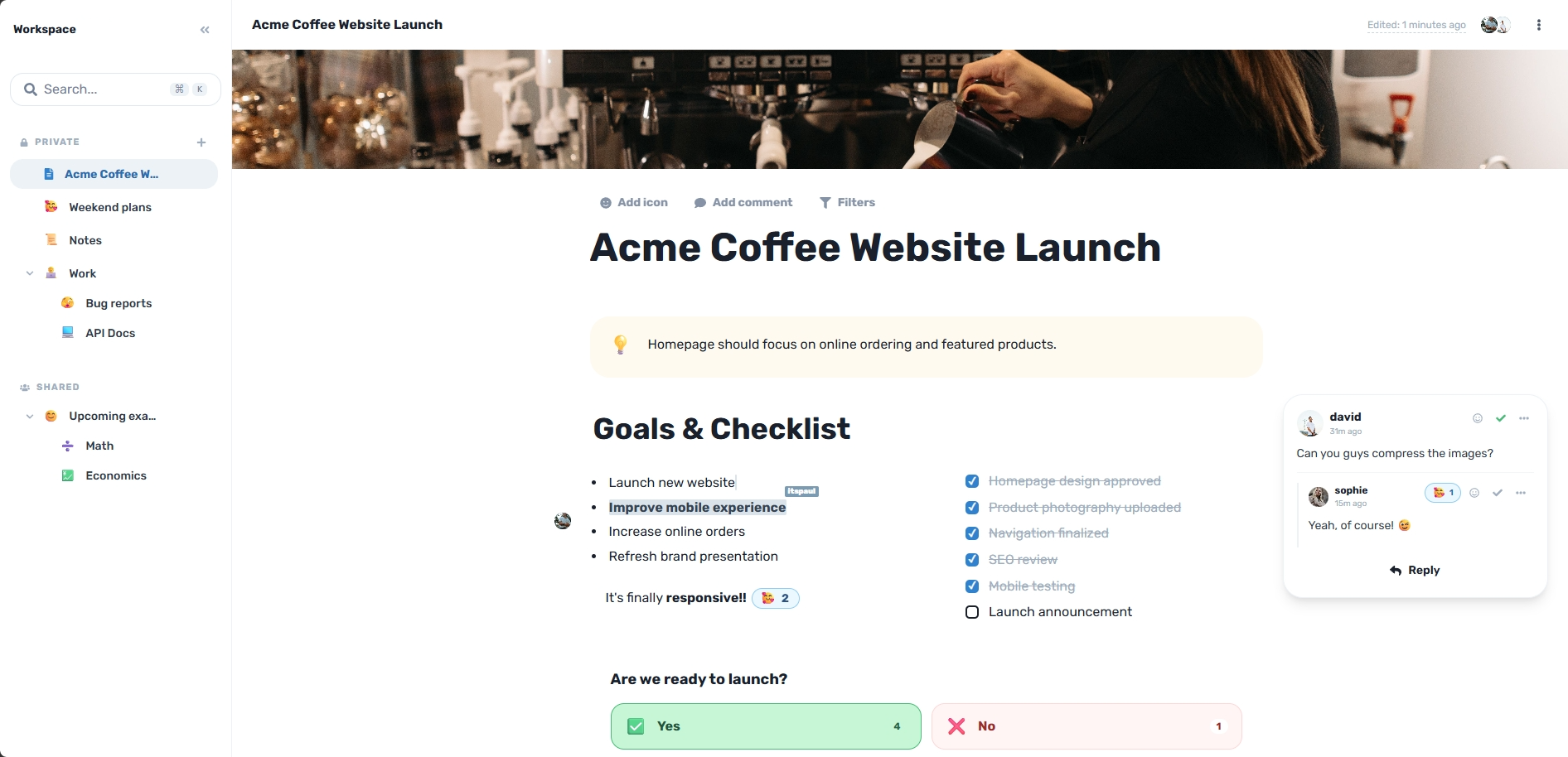
Workspace feels instantly familiar: pages, blocks and a clean sidebar. Then it goes further.
Write with blocks
Headings, to-dos, toggles, callouts, columns, tables, code and boards. Type / and build any page.
Encrypted by default
Page content is protected with authenticated AES-GCM-256 encryption before it is stored.
Lara AI in every page
Write, summarize, translate, explain and research the web without leaving the document.
Vault built in
Attach PDFs, images, recordings and documents from encrypted Vault storage right next to your notes.
Real-time teamwork
Edit together, comment on content and give viewer, editor or admin access page by page.
Publish in one click
Turn finished pages into a clean Workspace Site with navigation, search and SEO settings.
Comparison
ReadyTools Workspace vs Notion
Both give you pages and blocks. Workspace adds the security, AI and file tools serious work needs, in the same page.
| Notion | ReadyTools Workspace | |
|---|---|---|
| Pages, blocks and real-time editing | Yes | Yes |
| Page content encryption | Standard storage encryption | AES-GCM-256 encryption before storage |
| AI in the page | Notion AI, depending on plan | Lara AI with web research built in |
| Encrypted file storage | Regular file uploads | Encrypted Vault next to every page |
| Publishing | Published pages change as you edit | Snapshot publishing, drafts stay private |
| Voice notes in the page | Audio file uploads | Record audio right inside the page |
| Connected tools | Notion apps | Linksy, Vault, Lara and more ReadyTools apps |
How it works
Switch in an afternoon
No complicated migration. Bring what you use and keep working.
01
Create your Workspace
Sign up free and open a blank page or start from a template.
02
Bring your pages over
Paste your content in. Headings, lists and to-dos keep their structure, and files go into Vault.
03
Invite your team
Share a whole workspace or a single page tree with the right role for each person.
Frequently asked questions
Everything you need to know before you open your first page.
Make the switch to ReadyTools Workspace.
Pages, blocks, Lara AI, encrypted files and publishing in one secure workspace. Start free in seconds.
Private until you choose to share.
Explore more
More ways Workspace helps
Encrypted notes
Write private notes in an encrypted notes app built for real work. ReadyTools Workspace protects pages with AES-GCM-256, encrypted Vault files and page-level sharing.
AI note taking
Take smarter notes with Lara AI inside every page. Research the web, summarize, translate and turn team conversations into ready pages in ReadyTools Workspace.
Team wiki
Build your team wiki and knowledge base in ReadyTools Workspace. Real-time editing, roles, comments, team chat, search and public docs in one secure place.
ReadyTools Workspace
Notes, files, Lara AI, teamwork and publishing in one secure workspace.